Week 1 | Lesson 3

Collections, Advanced Functions & Lambdas

Lambdas, Higher-Order Functions, Extension Functions, Scope Functions, Collections, Sequences


© 2026 by Monika Protivová

Anonymous Function & Lambda Expression

Anonymous Function & Lambda Expression

Anonymous functions and lambda expressions are used to define functions without names.

Why do we need them?

In many situations, you want to pass a small piece of logic as an argument — for example, telling a sorting function how to compare elements, or defining what to do with each item in a list. Without lambdas, you'd have to define a separate named function every time, even for trivial one-line operations.

Lambdas and anonymous functions let you write this logic inline, right where it's needed. This makes your code shorter, easier to read, and closer to how you'd describe the task in plain language.

Anonymous Function & Lambda Expression

Lambda Expression

Lambda expressions are typically used for short, concise functions that are passed as arguments to higher-order functions. They are commonly used in collection operations like map, filter, and forEach.

val lambdaName: (Type) -> ReturnType = { argument: Type -> body }
💡 ️ If lambda expression has a single parameter, you can use the default name it.

Anonymous Function

Anonymous functions are used when you need more control over the function's return type or when you need to use the return statement to exit the function itself rather than the enclosing function.

val lambdaName = fun(name: Type): Type { return value }
💡 ️ Opposite of anonymous function is called a named function.

Examples: Lambda Expression

Function with one parameter and no return value:

val greet: (String) -> Unit = { name -> println("Hello, $name!") } greet("World")

If lambda expression has a single parameter, you can use the default name it:

val greet: (String) -> Unit = { println("Hello, $it!") } greet("World")

Function with two parameters and a return value:

val multiply: (Int, Int) -> Int = { a, b -> a * b } val result = multiply(10, 20)

Common examples of lambda function is the forEach:

listOf("Bangkok", "Barcelona", "Tokyo", "London", "New York").forEach { city -> println(city) }

Examples: Anonymous Function

Anonymous function with one parameter and no return value:
val greet = fun(name: String) { println("Hello, $name!") } greet("World")
Anonymous function with two parameters and a return value:
val multiply = fun(a: Int, b: Int): Int { return a * b } val result = multiply(10, 20)

Anonymous Function & Lambda Expression

Usage

In summary, lambda expressions are more concise and are typically used for simpler functions, while anonymous functions provide more flexibility with explicit return types and return behavior.

There are few use cases for lambda expressions and anonymous functions:

  • Passing functions as arguments to higher-order functions
  • Returning functions from other functions
  • Defining local functions that are not needed outside the scope of the enclosing function

Anonymous Function & Lambda Expression

Usage

In this example, the operation function takes two integers and a lambda function as arguments.

fun operation(x: Int, y: Int, func: (Int, Int) -> Int): Int { return func(x, y) }

The most common use way pass the function argument is:

val result = operation(10, 20) { x, y -> x + y }

Another possibility is to pass a function reference (it can be a named function or a member function):

val multiply: (Int, Int) -> Int = { a, b -> a * b } val result = operation(10, 20, multiply)

Anonymous Function & Lambda Expression

Usage

You can also return functions from other functions.

fun getCalculator(): (Int, Long, Double) -> Double { return { a, b, c -> a + b + c } }
val calculator = getCalculator() val result = calculator(1, 2, 3.0)

Exercise

Create a function named updateAtIndex that takes the following parameters:
  • An array of strings (Array<String>).
  • A variable number of integer indices (vararg atIndex: Int).
  • A lambda function (func: (String) -> String) that takes a string as an argument and returns a string.

The function should return a new array (copy) of Array<String> where the elements at the specified indices are updated using the provided lambda function. If any of the specified indices are out of bounds, the function should throw an error with the message "Index out of bounds".

Example

Given the following input:

  • array = ["a", "b", "c", "d", "e"]
  • atIndex: = 1, 3
  • func = { it.uppercase() }

The function should return:

["a", "B", "c", "D", "e"]

Scope Functions

Scope Functions

Scope functions allow you to execute a block of code within the context of an object.

Why use scope functions?

When working with objects, you often need to perform several operations in sequence — configure properties, check values, transform data. Without scope functions, this leads to repetitive variable references and temporary variables that clutter your code. Scope functions let you group these operations cleanly, making your intent immediately clear to anyone reading the code.

When you use a scope function, you can access the object's properties and functions without having to use the object's name.

The scope functions in Kotlin are let, run, with, apply, and also.

Each scope function has a different context object and return value, which makes them useful for different use cases.


Function Context object Return value Usage
let it Result of the lambda expression Execute a block of code on the result of a call chain or to work with nullable objects
run this Result of the lambda expression Often used when you want to perform multiple operations on an object and return a result
with this Result of the lambda expression Execute a block of code on an object
apply this The context object itself Typically used for initializing or configuring an object.
also it The context object itself Perform additional operations on an object without changing the object itself

let

Execute a block of code on the result of a call chain or to work with nullable objects.

The context object of the let function is referred to as it and the return value is the result of the lambda expression.

The let function is particularly useful when used with a nullable types, because it allows us to chain multiple operations on a nullable object.

data class Message( val text: String?, var acknowledged: Boolean = false ) { fun send(): Message { return Message(text = "Got it!", acknowledged = true) } } fun main() { val message = Message(text = "Hello") val response = message.send() val text = response.text?.let { println("Received message: $it") } }

run

Often used when you want to perform multiple operations on an object and return a result.

The context object of the run function is referred to as this and the return value is the result of the lambda expression.

data class Message( val text: String?, var acknowledged: Boolean = false ) { fun send(): Message { return Message(text = "Got it!", acknowledged = true) } } fun main() { val message = Message(text = "Hello").run { if (send().acknowledged) { println("Message acknowledged") } else { println("Message not acknowledged") } this } }

with

Use when you want to execute a block of code on an object.

The context object of the with function is referred to as this and it has no return value.

data class Message( val text: String?, var acknowledged: Boolean = false ) { fun send(): Message { return Message(text = "Got it!", acknowledged = true) } } fun main() { val message = Message(text = "Hello") with(message) { if (send().acknowledged) { println("Message acknowledged") } else { println("Message not acknowledged") } } }

apply

Typically used for initializing or configuring an object.

The context object of the apply function is referred to as this and it returns the modified context object.

data class Message( val text: String?, var acknowledged: Boolean = false ) { fun send(): Message { return Message(text = "Got it!", acknowledged = true) } } fun main() { val message = Message(text = "Hello").apply { acknowledged = true } }

also

used when you want to perform additional operations on an object without changing the object itself.

The context object of the also function is referred to as it and it returns the unmodified context object.

data class Message( val text: String?, var acknowledged: Boolean = false ) { fun send(): Message { return Message(text = "Got it!", acknowledged = true) } } fun main() { val message = Message(text = "Hello") .also { println(it) } val response = message.send() .also { println(it) } }

Ranges and Progressions

Additional Data Types

Additional Data Types

Ranges and Progressions
Pairs and Triples

Kotlin provides additional data types beyond primitive types and collections that help make code more expressive and concise.

As humans, we naturally think in terms of ranges — "from 1 to 10", "letters A through Z", "every other item". These data types let you express those ideas directly in code, making it read almost like natural language and reducing common mistakes like off-by-one errors.

These include:

  • Ranges
    • Represent sequences of values with a defined start and end.
    • Can be used in control structures like if, when, and for loops.
    • Support arithmetic operations like sum(), average(), count(), etc.
  • Progressions
    • Represent ordered sequences of values with a common difference (step).
    • Can be used in for loops and other control structures.
    • Support arithmetic operations like sum(), average(), count(), etc.

Ranges

Ranges are used to represent sequences of values.

Range represents an ordered set of values with a defined start and end. By default, it increments by 1 at each step.

val intRange: IntRange = 1..10 val longRange: LongRange = 1L..100L val charRange: CharRange = 'a'..'z'

Ranges can be used in if, when statements, and other control structures.

when (intNumber) { in 0..10 -> println("low") in 11..20 -> println("medium") in 21..30 -> println("high") else -> println("out of range") }

Arithmetic operations can be performed on ranges, such as sum(), average(), count(), and contains().

val sum = intRange.sum() val average = intRange.average() val count = intRange.count() val max = intRange.maxOrNull() val min = intRange.minOrNull()

Progressions

Progressions are ordered sequences of values with a common difference.

The ranges of integral types, such as Int, Long, and Char, can be treated as arithmetic progressions, defined by IntProgression, LongProgression and CharProgression types.

val intProgression: IntProgression = 1..10 step 2

Progressions have three essential properties:

  • first - the starting value of the progression.
  • last - the ending value of the progression.
  • step - a non-zero step which is a difference between consecutive values in the progression (positive or negative)
val first = intProgression.first // 1 val last = intProgression.last // 9 val step = intProgression.step // 2

Progressions can be used in for loop with a step.
for (index in 0..100 step 10) { /* ... */ }
Or use default step value of 1.
for (index in 0..100) { /* ... */ }

Arithmetic operations can be performed on progressions as well.

Collections

Collections

Collections are similar to arrays, but they are more flexible and have more features at the cost of being less efficient in terms of memory and performance.

Why collections?

In real-world programs, you almost always work with groups of things — users, orders, messages, scores. Collections are the everyday tool for this. You will use them constantly, and mastering them is one of the most practical skills in programming.

The main difference between arrays and collections is that collections can grow or shrink in size. They generally provide more functionality and are easier to work with than arrays, but also are less efficient in terms of memory and performance.

There are several types of collections in Kotlin, such as List, Set, Map, etc.

Unlike and array, which is basic data structure, collections are interfaces that define a set of operations that can be performed on a group of objects.

Collections

Collection is a group of variable number of objects of the same type (and its subtypes).

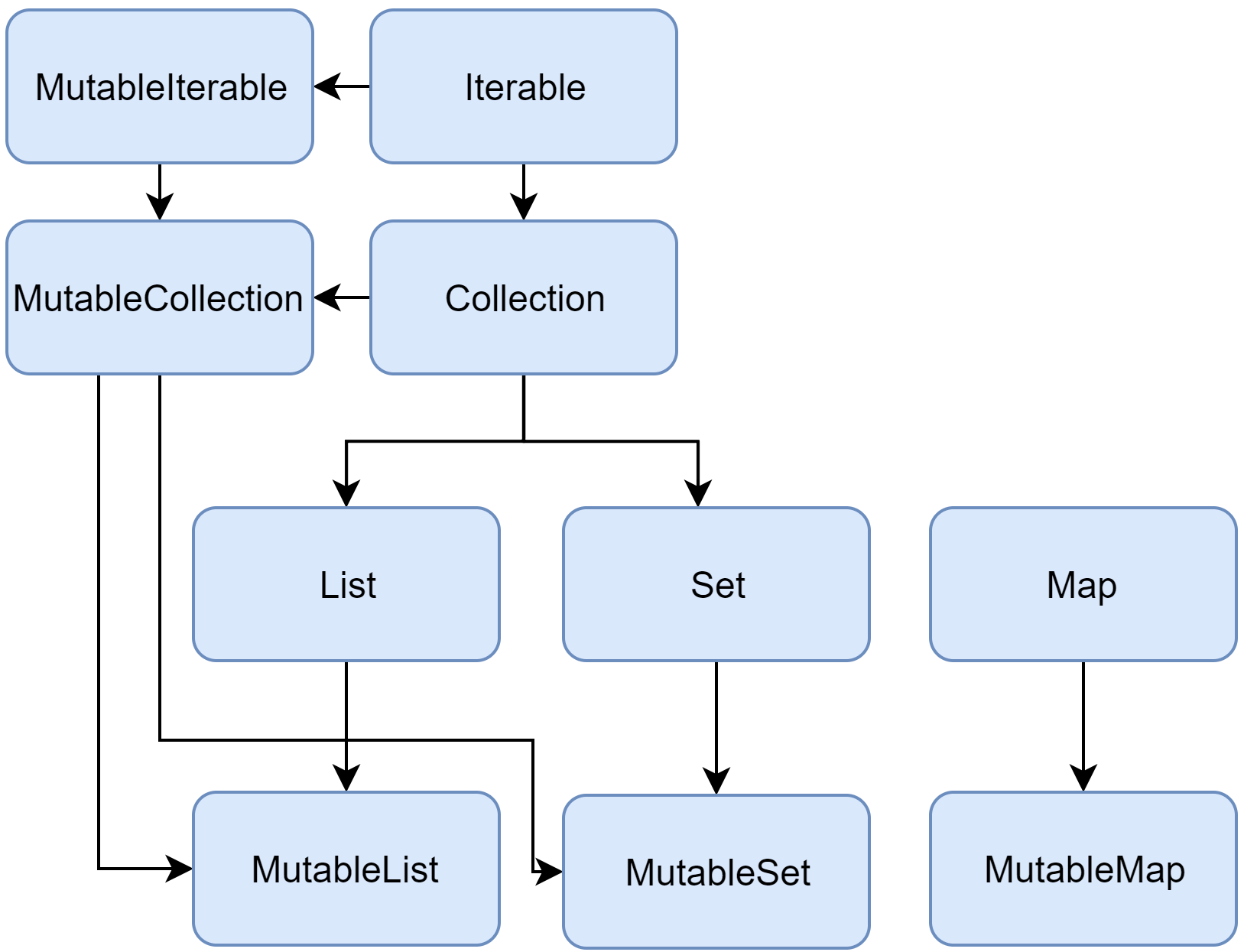
The Kotlin Standard Library provides implementations for basic collection types: sets, lists, and maps. A pair of interfaces represent each collection type:

  • read-only interface
    provides operations for accessing collection elements.
  • mutable interface
    extends the corresponding read-only interface with write operations: adding, removing, and updating its elements.

See Kotlin documentation for more details.

Collections diagram

Collections

There are 3 main types of collections in Kotlin: lists, sets, and maps.

Lists

Lists are ordered collections of elements that can contain duplicates and individual elements can be accessed by their index.

Sets

Sets are unordered collections of unique elements, meaning order is not guaranteed, and they don't allow duplicate elements.

You can work with a set just like you would with a list, but there are some differences:

  • You cannot access elements by index, because sets are unordered.
  • Adding an element that already exists in the set will not add a duplicate.
  • Removing an element that does not exist in the set will not throw an exception.


Maps

Maps are collections of key-value pairs, where keys are unique and are used to access values. Values can be duplicates.

Kotlin provides standard library functions for working with collections, which we will explore in more detail.

Constructing Collections

There are standard library functions for constructing collections in Kotlin for both read-only and mutable collections.

Collections are constructed using functions listOf<Type>(), setOf<Type>() or mapOf<KeyType, ValueType>() for read-only collections.

val list = listOf<String>() val set = setOf<Int>() val map = mapOf<String, Int>()

Or by variable type declaration.

val list: List<String> = listOf()

If type can be inferred from the elements, you can omit the type declaration.

val list = listOf("Java", "Kotlin", "JavaScript", "TypeScript", "Python") val set = setOf(2020, 2021, 2022, 2023, 2024, 2025) val map = mapOf( "Java" to 1995, "Kotlin" to 2011, "JavaScript" to 1995, "TypeScript" to 2012, "Python" to 1991 )

Constructing Collections

There are standard library functions for constructing collections in Kotlin for both read-only and mutable collections.

Mutable collections can be created using mutableListOf<Type>(), mutableSetOf<Type>() and mutableMapOf<KeyType, ValueType>().

To construct an empty collection, you can use the emptyList<Type>(), emptySet<Type>() or emptyMap<KeyType, ValueType>() functions.

val emptyList = emptyList<String>() val emptySet = emptySet<Int>() val emptyMap = emptyMap<String, Int>()

Similarly, empty collections can be created emptyMutableList<Type>(), emptyMutableSet<Type>() and emptyMutableMap<KeyType, ValueType>() functions.

Arrays vs. Collections

Both arrays and Collections are used to store data.
There are however some notable differences that make them suitable for different use cases.
Arrays Collections
Size Arrays have fixed size. This may lead to memory wastage, but is also inconvenient to work with. Collections can grow or shrink dynamically to accommodate the data.
Type Safety Arrays are type-safe Collections are type-safe (through generic typing)
Performance Arrays can perform better than collections for some operations because of their simpler memory layout, lower overhead, and ability to employ direct indexing. Collections have more overhead than arrays, and certain operations may be slower as a result. However, the built-in utilities in collections make them more convenient for complex data manipulation.
Functionality Arrays offer basic functionality such as adding elements, getting elements, and modifying existing elements. Collections provide a wide variety of functionalities. They can be sorted, reversed, shuffled. They support operations like addition, inspection, modification, deletion, searching and other.
Use Cases Arrays are best for fixed-size collections where performance is critical. Collections are best for dynamic collections with rich functionality and advanced operations.

Collections: Kotlin vs. Java

Collections in Kotlin are actually one of the most significant differences between Kotlin and Java, because they are implemented differently in Kotlin.
Java Kotlin
Null Safety Collections can contain null values unless explicitly handled. Collections are null-safe by default. You can explicitly declare nullable collections if needed.
Read-Only vs Mutable Collections are mutable by default. Read-only views can be created using utility methods. Distinguishes between read-only (List, Set, Map) and mutable (MutableList, MutableSet, MutableMap) collections.
Higher-Order Functions Introduced lambda expressions and streams in Java 8, but the syntax is more verbose compared to Kotlin. Supports higher-order functions and lambda expressions, making it easier to perform operations like filtering, mapping, and reducing.
Default Implementations Requires more boilerplate code for common operations. Provides default implementations for many collection operations, making the code more concise.
Note that because Java and Kotlin are fully interoperable, you can opt to use Java implementations of collections in Kotlin, if needed.

Collection Operations

Adding, Removing and Retrieving Elements

Operations

The Kotlin standard library provides a rich set of functions for working with collections.

Why learn collection operations?

Without these operations, you'd write manual loops every time you need to find, filter, or transform data. Collection operations let you express what you want declaratively — "give me all even numbers" instead of "create an empty list, iterate, check each element, add matching ones". This is not only shorter but also less error-prone.

Collection operations are declared in the standard library in two ways:

  1. Member functions of collection interfaces defining operations that are essential for the collection type.
  2. Extension functions providing additional functionality.

This is important to know in case you want to implement you own collection type as you will need to implement all functions in the given interface(s).

Some of the common operations on collections include:

  • Transformations
  • Filtering
  • plus and minus operators
  • Grouping
  • Retrieving collection parts
  • Retrieving single elements
  • Ordering
  • Aggregate operations

Adding Elements

For immutable collections, you can use the plus() function to create a new collection with the added element.

val list = mutableListOf("Java", "Kotlin", "JavaScript", "TypeScript") list.plus("Python")

For mutable collections, you can use the add(), addFirst(), addLast() and addAll()functions to add an elements to the collection.

val mutableList = mutableListOf("Java", "Kotlin") mutableList.add("C#") mutableList.addLast("Rust") mutableList.addAll(listOf("JavaScript", "TypeScript"))

For both mutable and immutable collections, you can use the + operator to create a new collection with the added element.

val newList = list + "Python"

You can also add elements to mutable collections using the += operator.

mutableList += "Python"

And finally, you can use the addAll(), addFirst(), and addLast() functions to add multiple elements to a mutable collection.

Removing Elements

Removing elements is similar.

Immutable collections provide the minus() function and the - operator to create a new collection with the removed element.

val list = mutableListOf("Java", "Kotlin", "JavaScript", "TypeScript", "Python") val newList = list - "JavaScript"

Mutable collections provide the remove(), removeFirst(), removeLast()removeAt(), removeAll() and also removeIf() functions to remove an element from the collection.

val mutableList = mutableListOf("Java", "Kotlin", "JavaScript", "TypeScript", "Python") mutableList.remove("JavaScript") // removes element "JavaScript" mutableList.removeAt(2) // removes element at index 2 mutableList.removeAll(listOf("Java", "Kotlin")) // removes elements "Java" and "Kotlin" mutableList.removeIf { it.length > 5 } // removes elements with length > 5

You can also use the -= operator to remove an element from a mutable collection.

mutableList -= "JavaScript"

Retrieving Elements

Retrieving elements from a collection is straightforward and similar to arrays.

Here are few examples:

val list = listOf("Java", "Kotlin", "JavaScript", "TypeScript", "Python") // get element at index 2 val element = list[2] // get first element val first = list.first() // get last element val last = list.last() // get element at index 2 or return "C++" if index is out of bounds val elementAtOrElse = list.getOrElse(2) { "C++" } // get element at index 10 or return null if index is out of bounds val elementAtOrNull = list.getOrNull(10) // you can also use the random() function to get a random element from the collection val randomElement = list.random()

Retrieving collection parts

You are not limited to retrieving single elements from a collection. You can also retrieve parts of a collection, or slices.

These are some of the functions available in the Kotlin SDK:

  • slice - returns a list of elements at the specified indices.
  • take - returns a list of the first n elements.
  • takeLast - returns a list of the last n elements.
  • takeWhile - returns a list of elements that match the predicate.
  • drop - returns a list of elements after the first n elements.
  • dropLast - returns a list of elements before the last n elements.
  • dropWhile - returns a list of elements after the first element that does not match the predicate.

Examples of using these functions:

val numbers = listOf(1, 2, 3, 4, 5, 6, 7, 8, 9, 10) val slice = numbers.slice(2..5) // [3, 4, 5, 6] val firstThree = numbers.take(3) // [1, 2, 3] val lastThree = numbers.takeLast(3) // [8, 9, 10] val takeWhileSmall = numbers.takeWhile { it < 5 } // [1, 2, 3, 4] val dropFirst = numbers.drop(3) // [4, 5, 6, 7, 8, 9, 10] val dropLast = numbers.dropLast(3) // [1, 2, 3, 4, 5, 6, 7]
Traversing Collections

Traversing Collections

Traversal is the act of visiting each element in a collection, one at a time.

Why does traversal matter?

Storing data in a collection is only half the story — you also need to go through it. Whether you're printing a list of names, searching for a specific item, or applying a transformation to every element, you are traversing a collection.

Kotlin provides several ways to traverse collections, from low-level iterators to expressive higher-order functions. Choosing the right approach makes your code clearer and communicates your intent — are you just reading elements, modifying them, or do you need the position of each?

Iterators

Kotlin provides standard library functions for traversing collections using iterators.

Iterators can be obtained for collections that implement the Iterable interface by calling the iterator() function.
Once you have an iterator, you can traverse the collection using the next()and hasNext() functions.

val list = listOf("Java", "Kotlin", "JavaScript", "TypeScript", "Python") val iterator = list.iterator() while (iterator.hasNext()) { println(iterator.next()) }

For List, there is also ListIterator, which allows traversing the list in reverse order by using the previous() function.

For mutable collections, you can use the MutableIterator, which provides a remove() function to remove elements from the collection.

val mutableList = mutableListOf("Java", "Kotlin", "JavaScript", "TypeScript", "Python") val iterator = mutableList.iterator() while (iterator.hasNext()) { val element = iterator.next() if (element == "JavaScript") { iterator.remove() } }

For Loop

You can use a for loop to iterate over collections that implement the Iterable interface
(or its subtypes).

Iterators are not the most idiomatic way to iterate over collections, so Kotlin provides other ways to iterate over collections which implement the Iterable interface.

One of such ways is to use a for loop.

val list = listOf("Java", "Kotlin", "JavaScript", "TypeScript", "Python") for (element in list) { println(element) }

You can also iterate with index using withIndex() function:

for ((index, element) in list.withIndex()) { println("Element at index $index is $element") }

The forEach Function

Another way to iterate over collections is to use the forEach function.

The forEach function is a higher-order function that takes a lambda as an argument. The basic syntax is ...

val list = listOf("Java", "Kotlin", "JavaScript", "TypeScript", "Python") list.forEach { println(it) }

By default, the lambda passed to the forEach function takes a single argument, which can be referenced using the it keyword.

You can also specify the argument name explicitly (in this case, element).

list.forEach { element -> println(element) }

There is also a shorthand syntax for the lambda if it takes a single argument.

list.forEach(::println)

The forEachIndexed Function

You can use the forEachIndexed function to iterate over collections with index.

The forEachIndexed function is similar to the forEach function, but it also provides the index of the element as the first argument to the lambda. This may be useful in some situations.

val list = listOf("Java", "Kotlin", "JavaScript", "TypeScript", "Python") list.forEachIndexed { index, element -> println("Element at index $index is $element") }

This function is particularly useful when you need both the position and the value of each element in your collection.

Collection Transformations

Collection Transformations

There are many operations that can be performed on collections to transform them in some way which are part of the Kotlin SDK.

Why are transformations powerful?

In practice, raw data rarely comes in the shape you need. You receive a list of users but need just their names. You have sales records but need them grouped by month. Transformations let you reshape data declaratively — describing the result you want rather than manually building it step by step. They are composable, meaning you can chain them together to express complex data processing in a readable way.

Some common transformation operations performed on collections include:

  • map using functions like map, flatMap, mapNotNull, mapIndexed, mapIndexedNotNull.
  • filter using functions like filter, filterNot, filterIndexed, filterNotNull, distinct, distinctBy.
  • sort using functions like sorted, sortedBy, sortedWith, sortedDescending, sortedByDescending, reversed, shuffled.
  • group using functions like groupBy, partition, associate, associateBy, associateWith.
  • plus, minus to add or remove elements from a collection.
  • other transformation functions like reduce, zip, zipWithNext, unzip, flatten, fold.

All of these transformations return a new collection with the transformation applied, they do not modify the original collection.

Mapping Functions

map is a transformation operation that applies a function to each element in the collection and returns a new collection with the results.

The returned collection can be of any type, not necessarily the same as the original collection.

There are several map functions available in the Kotlin standard library:

  • map - applies a function to each element and returns a list of the results.
  • mapNotNull - applies a function to each element and returns a list of non-null results.
  • mapIndexed - applies a function to each element and its index and returns a list of the results.
  • mapIndexedNotNull - applies a function to each element and its index and returns a list of non-null results.
  • flatMap - applies a function to each element and returns a list of the results, which are then flattened into a single list.
  • mapTo, mapIndexedTo, mapNotNullTo, etc ... - applies a function to each element and adds the results to the given destination.

Examples:

val numbers = listOf(1, 2, 3, 4, 5) val squares = numbers.map { it * it } // [1, 4, 9, 16, 25] val indexed = numbers.mapIndexed { index, value -> "$index: $value" } val words = listOf("Hello", "World") val letters = words.flatMap { it.toList() } // ['H','e','l','l','o','W','o','r','l','d']

Filtering Functions

Kotlin SDK provides us with a rich set of functions for filtering collections. Like map, filter returns a new collection with the elements that satisfy a predicate.

Generally, the returned collection is the same type as the original collection.

Some of the filter functions available in the Kotlin standard library include:

  • filter - filters elements based on a predicate and returns a list of elements that satisfy the predicate.
  • filterNot - filters elements based on a predicate and returns a list of elements that do not satisfy the predicate.
  • filterNotNull - filters out null elements and returns a list of non-null elements.
  • filterIndexed - filters elements based on a predicate with index and returns a list of elements that satisfy the predicate.
  • distinct - returns a list containing only unique elements from the original collection.
  • distinctBy - returns a list containing only elements that are distinct by the given selector function.

Examples:

val numbers = listOf(1, 2, 3, 4, 5, 6, 7, 8, 9, 10) val evenNumbers = numbers.filter { it % 2 == 0 } // [2, 4, 6, 8, 10] val oddNumbers = numbers.filterNot { it % 2 == 0 } // [1, 3, 5, 7, 9] val evenIndexed = numbers.filterIndexed { index, _ -> index % 2 == 0 } val duplicates = listOf(1, 2, 2, 3, 3, 3) val unique = duplicates.distinct() // [1, 2, 3]

Grouping and Sorting

Grouping

The result of grouping operations is a map where the key is the result of the selector function and the value is a list of elements.

  • groupBy - groups elements by the result of the given selector function.
  • partition - splits the collection into a pair of lists based on a predicate.
  • associate - creates a map from the elements of the collection.
  • associateBy - creates a map from the elements of the collection using the provided key selector function.
  • associateWith - creates a map from the elements of the collection using the provided value selector function.

Sorting

  • sorted - sorts elements in natural order.
  • sortedBy - sorts elements by the result of the given selector function.
  • sortedWith - sorts elements using the given comparator.
  • sortedDescending - sorts elements in reverse natural order.
  • sortedByDescending - sorts elements by the result of the given selector function in reverse order.
  • reversed - reverses the order of elements in the collection.
  • shuffled - shuffles the elements in the collection.

Examples:

val words = listOf("apple", "banana", "cherry", "date", "elderberry") val grouped = words.groupBy { it.first() } // Result: {a=[apple], b=[banana], c=[cherry], d=[date], e=[elderberry]} val (short, long) = words.partition { it.length <= 5 } // short: [apple, date], long: [banana, cherry, elderberry] val sortedByLength = words.sortedBy { it.length } // Result: [date, apple, banana, cherry, elderberry]

Other Transformation Functions

There are even more useful transformation functions available in the Kotlin SDK. Some worth mentioning are:

  • reduce - combines elements of a collection into a single value.
  • zip - combines two collections into a single collection of pairs.
  • zipWithNext - combines each element with the next element in the collection.
  • unzip - splits a collection of pairs into two collections.
  • flatten - flattens a collection of collections into a single collection.
  • fold - combines elements of a collection into a single value starting with an initial value.

Examples:

val numbers = listOf(1, 2, 3, 4, 5) val sum = numbers.reduce { acc, n -> acc + n } // 15 val product = numbers.fold(1) { acc, n -> acc * n } // 120 val names = listOf("Alice", "Bob", "Charlie") val ages = listOf(25, 30, 35) val people = names.zip(ages) // [(Alice, 25), (Bob, 30), (Charlie, 35)] val nested = listOf(listOf(1, 2), listOf(3, 4), listOf(5, 6)) val flat = nested.flatten() // [1, 2, 3, 4, 5, 6] val consecutive = numbers.zipWithNext() // [(1, 2), (2, 3), (3, 4), (4, 5)]

Sequences

Sequences

Kotlin standard library provides a Sequence additional to collections.

Why do sequences exist?

Imagine you have a million records and need to filter, transform, and take just the first 5 results. With collections, every step processes all million items and creates a new intermediate list. Sequences solve this by processing elements one at a time, on demand — so you only do as much work as needed.

Unlike collections, sequences don't contain elements, they produce them while iterating. This is useful when you need to perform multi-step operations on a collection.

Operations on collections are executed eagerly, meaning they perform all operations on all elements immediately.
Operations sequences are executed lazily, meaning they perform operations on elements only when needed.

This can be beneficial for large collections or when you need to perform complex operations on elements.
On the other hand, sequences may be less efficient for small collections or simple operations.

Sequences offer the similar functions as collections, such as forEachmapfilter

The main difference is that when working with sequences, we distinguish between intermediate and terminal operationswhere intermediate operations return a new sequence and terminal operations return a result.

What that means is that when you call a terminal operation, all intermediate operations are executed and the collection is so called "consumed"

!!! Keep this in mind because if you call a terminal operation prematurely, you may either end up with unexpected results, or at least with a performance hit. !!!

Creating Sequences

From elements:
val sequence = sequenceOf(1, 2, 3, 4, 5)
From an Iterable:
val sequence = listOf(1, 2, 3, 4, 5).asSequence()
From a function:
val sequence = generateSequence(1) { it + 1 }
From chunks:
val sequence = sequence { for (i in 1..5) { yield(i) } }

Sequences vs Collections

Understanding when to use sequences versus collections is important for performance.

Here's an example that demonstrates the difference between eager (collections) and lazy (sequences) evaluation:

val numbers = (1..1000000).toList() // Collection approach (eager evaluation) val resultCollection = numbers .filter { it % 2 == 0 } // Creates intermediate list .map { it * it } // Creates another intermediate list .take(5) // Creates final list with 5 elements // Sequence approach (lazy evaluation) val resultSequence = numbers.asSequence() .filter { it % 2 == 0 } // No intermediate collection created .map { it * it } // No intermediate collection created .take(5) // Only processes first 10 elements to get 5 results .toList() // Terminal operation - converts to list

In the collection approach, each operation processes all 1,000,000 elements and creates intermediate collections.

In the sequence approach, only the first 10 elements are processed (to find 5 even numbers), and no intermediate collections are created until the terminal toList() operation.

Sequences vs Collections

When to use sequences and when to use collections?

Use sequences for

  • Large collections with multiple chained operations
  • When you need only a subset of the final result
  • Memory-constrained environments
  • Potentially infinite data streams

Use collections for

  • Small collections
  • Single operations
  • When you need random access to elements
  • When simplicity is more important than performance